01
Systems Analysis & Design · Course Project
KoL Combat Item Catalog
KoLmafia (Mafia) is a community-maintained tool that adds quality-of-life features to the browser game Kingdom of Loathing. It already helps players manage equipment, consumables, potions, and buffs through the Modifier Maximizer, but nothing gives players the same insight into combat items. Information about these items is scattered across wiki pages, item descriptions, and player knowledge, and much of it is out of date. The proposed system is an independent, structured catalog of combat items, organized by categories and searchable properties such as elemental damage, restoration, combat effects, unusual behaviors, inventory quantity, and Mall price. It is designed for Mafia users, script authors, and wiki maintainers. The analysis and design work is mostly complete, and the remaining work is revision, feasibility analysis, and final integration.
The project
Purpose & direction
Combat items are hard to use intelligently
Players have to consider many factors before using a combat item, including what they own, how powerful it is, and how rare or valuable it is. Today they must look items up manually, guessing at the best option, or rely on wiki lists that are likely out of date. Because of this, it often feels easier to ignore combat items entirely. The lack of per-item insight also increases the risk of using up a reserve of expensive or limited-time items that can’t easily be replaced, such as Bottle of Fire. Players may also overlook a cheaper item they own in large quantity, or waste a banish on a monster they wanted to fight again. An information system is appropriate because the data is large, structured, changes with the game, and needs to be queried by both people and scripts.
A structured catalog players and scripts can query
Vision: The system will give KolMafia users a structured catalog of combat items that lets them identify, categorize, and query items by their effects and other useful properties, so they can make better-informed decisions about how to use their inventory.
The initial build focuses on stat-based behaviors that are easy to quantify, such as damage and restoration, and looks for common patterns before adding categories for unusual items.
- A combat item database with basic properties and effects, where an item can belong to more than one category
- A companion script that queries by damage or restoration type, quantity owned, and current Mall price
- A data validation (“spading”) script that helps verify the data
- Integration into the Mafia codebase itself
- Every possible combat-item behavior; damage and restoration come first
- Non-combat items
- Users can find items that perform a specific function
- Similar items can be compared by quantity, strength, and Mall price
- Scripts can read the catalog when making combat decisions
Design principle: start with clearly defined, stat-based item behaviors
and a manageable catalog. Validate entries before expanding into harder-to-classify special
cases.
Key dates
Major milestones
The next upcoming milestone is highlighted automatically.
MILESTONE 01Project hub live
MILESTONE 02Stories, use cases, requirements, ERD, data dictionary, and business rules revised
MILESTONE 03Feasibility analysis complete
MILESTONE 04Prototype feedback collected and business case sections complete
MILESTONE 05Revision memo complete
MILESTONE 06Draft final report complete
MILESTONE 07Narrated presentation complete
MILESTONE 08Final report, presentation, and memo ready to submit
System design work
Current deliverables
Status of each project artifact. Links are added as files are finalized.
02
03
04
05
06
07
08
09
Feasibility Analysis
Not started Link added when finished10
Final Systems Analysis and Design Report
Not started Link added when finished11
Narrated Presentation
Not started Link added when finished12
Final Revision Memo
Not started Link added when finishedDiagrams and prototype
Models & prototype
Select an image to open it at full size.
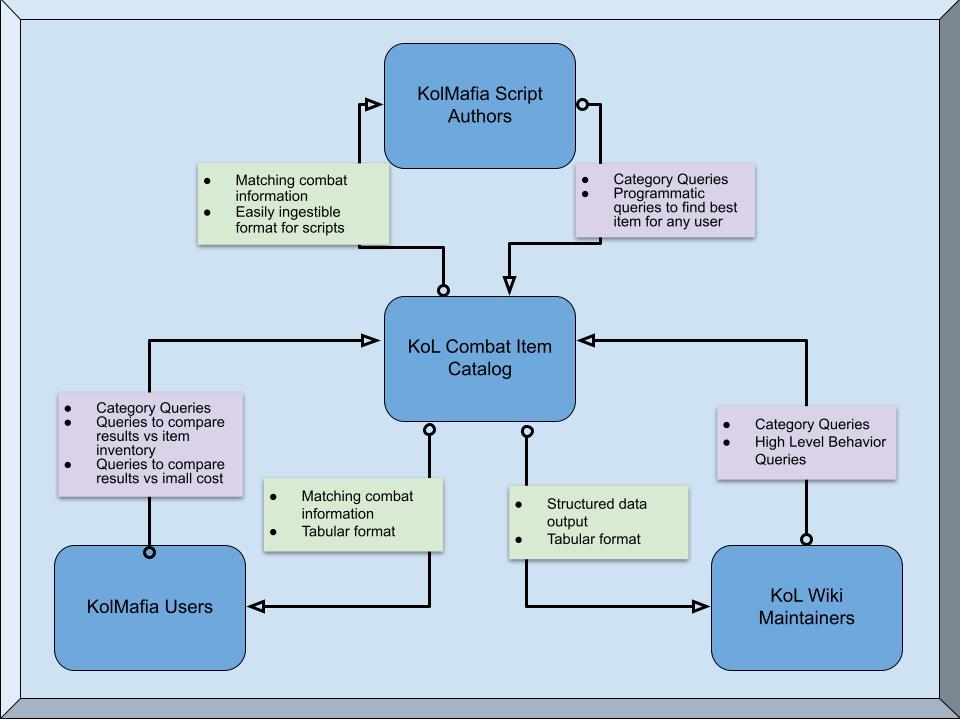
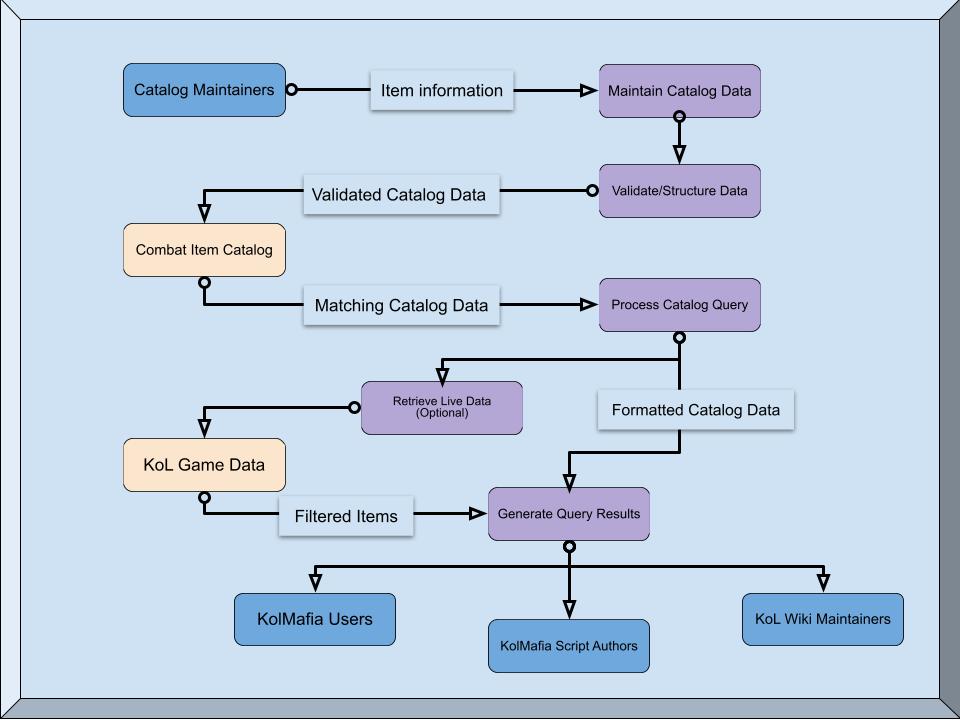
The prototype screens (Search, Results, and Compare) are in deliverable 06 above. The data model is in deliverable 05.
Project management
Planning documents
Documents used to organize, schedule, and monitor the remaining project work.
01
Project Activity List
Major project activities, their descriptions, estimated durations, dependencies, and resulting deliverables.
Prepared for schedule development Open PDF ↗02
Project Schedule
Planned start and finish dates, activity dependencies, overlapping tasks, deliverables, and completion status.
In progress; update as needed View on this page ↓03
PERT/CPM Diagram
Activity sequence, dependencies, estimated durations, and the critical path used to identify schedule-sensitive work.
Complete; verify before submission Open PDF ↗04
Milestone Plan
Major checkpoints for requirements and data-model revisions, feasibility, prototype review, report completion, and final submission.
Planned; review against assignment deadlines View on this page ↑
The activity list, schedule, and PERT/CPM diagram should agree on activity names, dependencies, and durations. Revise them together when the project plan changes.
October 25 – November 9
Project schedule
Weekends are working days. The chart and the table show the same plan.
October
November
Buffer
25262728293031
123456789
101112
ABuild project hub
BReview documents
CRevise stories & use cases
DRevise ERD & data dictionary
EFinalize process model
FRevise prototype screens
GPrototype review
HFeasibility analysis
NBusiness case & deployment
IUpdate approach memo
MFinal revision memo
JAssemble final report
KNarrated presentation
LProofread and revise
Critical path (no slack)
Has slack
Done
Buffer, Nov 10–12 (due Nov 12, 10:59 PM CST)
Today
| ID | Activity | Start | Finish | Dependencies | Deliverable | Status |
|---|---|---|---|---|---|---|
| A | Build project hub | Oct 25 | Oct 25 | None | Project hub with links | Hub created |
| B | Review completed project documents | Oct 26 | Oct 26 | None | Revision list | Upcoming |
| C | Revise user stories, use cases, requirements | Oct 27 | Oct 27 | B | Updated stories, use cases, requirements, test checklist | Planned |
| D | Revise ERD, data dictionary, business rules | Oct 27 | Oct 28 | B | Updated data model and rules | Planned |
| E | Finalize process model and narrative | Oct 29 | Oct 30 | D | Context diagram, DFD, narrative | Planned |
| F | Revise prototype screens | Oct 29 | Oct 30 | C, D | Updated clickable prototype | Planned |
| G | Prototype review with 2–3 users | Oct 31 | Nov 2 | F | Feedback summary | Planned |
| H | Feasibility analysis | Oct 31 | Nov 1 | A, D, E | Feasibility section | Planned |
| N | Business case, recommendation, deployment | Nov 2 | Nov 2 | H | Business case and deployment sections | Planned |
| I | Update development approach memo | Nov 3 | Nov 3 | G, H | Final recommendation memo | Planned |
| M | Write final revision memo | Nov 4 | Nov 4 | I | Revision memo | Planned |
| J | Assemble final report | Nov 4 | Nov 6 | A, C, E, G, H, I, N | Draft final report | Planned |
| K | Prepare narrated presentation | Nov 6 | Nov 7 | J (starts on final day) | Narrated slide deck | Planned |
| L | Proofread and revise | Nov 8 | Nov 9 | J, K, M | Final submission | Planned |
Dates are the planned dates for this project. Activities may overlap when dependencies allow. Mark an activity done by changing its status pill to state done; the progress bar at the top updates itself.
Finish strong
Final checklist & next steps
Check items off as you complete them. Your checks are saved in this browser.